
Open RAR, 7Z and ZIP files. Compress anything.
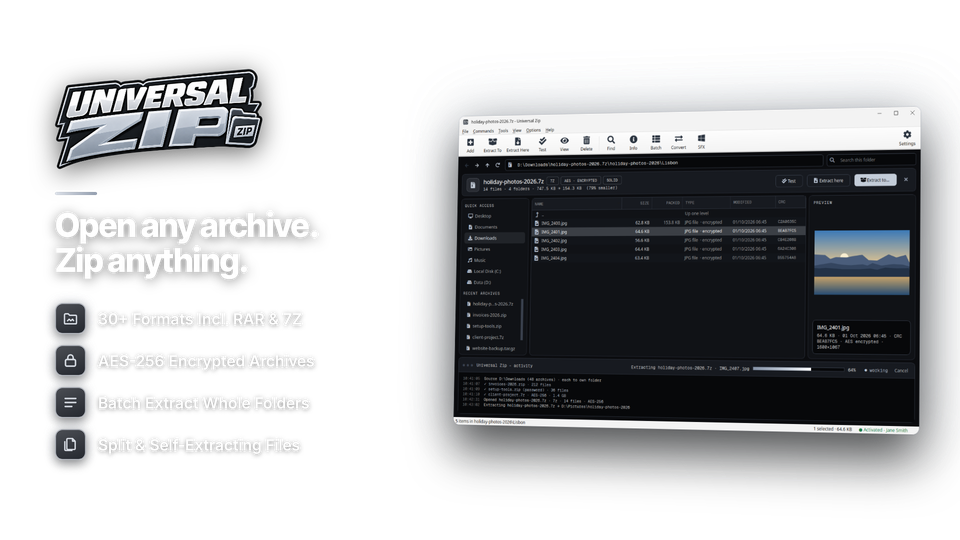
Universal Zip opens and extracts more than 30 archive formats - RAR, 7Z, ZIP, ISO, TAR and multi-part sets - and creates ZIP, 7Z and TAR archives with AES-256 encryption, split volumes and self-extracting EXE files. Browse inside an archive before you extract, or do it all from the Windows right-click menu.
Everything you need from a zip program, in one tidy window.
Windows opens ZIP files and little else. Universal Zip opens almost anything you download and makes small, secure archives - without trial pop-ups.
Extract
Opens almost any archive
ZIP, RAR and RAR5, 7Z, ISO, TAR, GZ, TGZ, BZ2, XZ, CAB, ARJ, LZH, Z and more - over 30 formats, including multi-part sets and password-protected archives, using the 7-Zip engine.
Right-click from Explorer
Extract Here, Extract to folder, Add to archive, Add to ZIP and Compress and email - straight from the Windows right-click menu.
Batch extract in one go
Extract a whole folder of archives, each into its own sub-folder, choose to overwrite or skip, try your saved passwords, and optionally delete archives that extracted cleanly.
Compress
Create ZIP and 7Z archives
Create ZIP, 7Z, TAR, TAR.GZ, TAR.BZ2 and TAR.XZ archives with six compression levels from Store to Ultra, and add files to - or delete them from - existing ZIP and 7Z archives.
Split into volumes
Split big archives into parts of any size, or use presets for email, CD, USB sticks (4 GB FAT32), DVD and Blu-ray. Parts join back together automatically when extracted.
Self-extracting archives
Make a self-extracting EXE that unpacks on any Windows PC, so the person you send it to doesn't need a zip program.
Protect and manage
AES-256 password protection
Encrypt ZIP and 7Z archives with AES-256, hide the file names inside 7Z archives, and let the password manager remember the passwords you use most.
Browse and preview first
Look inside any archive like a folder, preview images and text, search by name and drag out just the files you need.
Test and convert archives
Check an archive for damage before you rely on it, or convert in one step - a RAR into a ZIP, or a ZIP into a smaller 7Z. The activity panel keeps a history of what you extracted, created and tested.
The archive formats you'll actually meet.
Open more than 30 formats. Create the ones that matter.
| Format | Open | Create | Best for |
|---|---|---|---|
| ZIP | yes | yes, AES-256 | Sharing - opens everywhere |
| 7Z | yes | yes, AES-256 | Smallest files and backups |
| RAR · RAR5 | yes | open only | Downloads and multi-part sets |
| TAR · GZ · TGZ · BZ2 · XZ | yes | yes | Linux, web servers and developers |
| ISO · CAB | yes | open only | Disc images and installers |
| EXE (self-extracting) | yes | yes | Recipients with no zip program |
| ARJ · LZH · Z and more | yes | open only | Older archives |
From a messy folder to one small, secure file in four steps.
Or just double-click any archive to open it.
Select your files
Or right-click in Explorer.
files 214
Pick a format
ZIP, 7Z or TAR.
level Ultra
Protect & split
Password and volumes.
split 25 MB
Compress
Tested and ready.
test OK

For anyone who opens, sends or stores files.
Open whatever you download
RAR, 7Z and ISO files that Windows won't open, extracted with a double-click or a right-click.
Send big files securely
Compress, encrypt with AES-256 and split to fit email limits - or right-click and Compress and email.
Backups and server files
7Z at Ultra for backups, TAR.GZ for servers, integrity tests and batch extraction of whole folders.
One license. Every format. Yours to keep.
Opening, creating, encryption, split volumes and self-extracting archives are all included. No subscription, no nag screens, free updates.
- Opens30+ formats
- CreatesZIP, 7Z, TAR, EXE
- Works onWindows 10 & 11 (64-bit)
- Updatesfree
- Activations1 PC
- Deliverydownload + key by email
Checkout
You'll go straight to your download page once payment is confirmed, and we'll email your download link and license key.
Already bought? Get your download link again.
Zip and archive questions, answered.
How do I open a RAR file on Windows?
Install Universal Zip, then double-click the RAR file to browse it, or right-click it and choose Extract Here. RAR5 and multi-part RAR sets are supported.
Which archive formats can it open?
More than 30, including ZIP, RAR and RAR5, 7Z, ISO, TAR, GZ, TGZ, BZ2, XZ, CAB, ARJ, LZH and Z, plus multi-part and password-protected archives.
Which formats can it create?
ZIP, 7Z, TAR, TAR.GZ, TAR.BZ2 and TAR.XZ, with six compression levels, plus self-extracting EXE files. RAR can be opened but not created.
Can I password-protect an archive?
Yes. ZIP and 7Z archives can be encrypted with AES-256, 7Z archives can hide their file names too, and the password manager remembers the passwords you use most.
Can I split a large file?
Yes. Split into volumes of any size or use presets for email, CD, USB, DVD or Blu-ray. The parts join back together automatically when extracted.
Can I extract many archives at once?
Yes. Batch extraction puts each archive into its own sub-folder, can try your saved passwords, and can delete archives that extracted cleanly.
Does it add right-click options?
Yes: Extract Here, Extract to folder, Add to archive, Add to ZIP and Compress and email.
Can I view an archive without extracting it?
Yes. Browse it like a folder, preview images and text, search by name and drag out just the files you need.
Which versions of Windows are supported?
Universal Zip runs on 64-bit Windows 10 (version 1809 or later) and Windows 11. You can open and browse archives before activating; extracting, creating, testing and converting unlock with your installation key.
Is it a subscription or a nagging trial?
No. It is a one-time payment of $24.95 with free updates and no nag screens.
How do I get the software after paying?
You go straight to your download page once payment is confirmed, and your download link and installation key are emailed to you. In Universal Zip, choose Settings > Enter Installation Key and click Activate.
Every archive, one simple app.
Open 30+ formats, create secure ZIP and 7Z archives. One license, no nag screens.
Get Universal Zip · $24.95